# Building Vagrant Boxes with Packer in Atlas
> Explore hassle-free Vagrant box creation with Packer in Atlas. Harness the power of seamless integration for efficient box building and management.
- Canonical: https://www.russ.cloud/2015/07/26/building-vagrant-boxes-with-packer-in-atlas/
- Published: 2015-07-26
- Author: Russ McKendrick
- Tags: Tools, Packer
---
I have a need to create both some Ubuntu and CentOS Vagrant boxes for a project I am working on.
Normally I would have created them on my local machine, uploaded the artifacts to an Amazon S3 bucket and then published them using [Atlas](https://atlas.hashicorp.com "Atlas website") (formally [Vagrant Cloud](https://atlas.hashicorp.com/boxes/search?utm_source=vagrantcloud.com&vagrantcloud=1)).
However in the past month [HashiCorp](https://hashicorp.com "HashiCorp site") have updated Atlas so that you can now build [Packer](https://packer.io "Packer") templates directly within Atlas and publish the artifacts as Vagrant Boxes, all free of charge. This is great for me as it means that I will not incur the hosting and distribution costs.
#### Getting started
If you haven’t already [sign up for an Atlas account](https://atlas.hashicorp.com/account/new). I would recommend that you immediately [enable two factor authentication](https://atlas.hashicorp.com/settings/security) just incase.
#### Installing Packer & Vagrant
As I am 100% Mac based these instructions only cover installing Packer & Vagrant using [Homebrew](https://brew.sh/).
For the Atlas interaction you need to make sure you are using the latest versions of both pieces of software, at the time of writing these are;
- Packer 0.8.2
- Vagrant 1.7.4
First of all, ensure Homebrew is up-to-date;
```bash frame="terminal" title="Building Vagrant Boxes with Packer in Atlas 1/9"
brew update
```
Once updated you can install the software by using;
```text frame="terminal"
brew install packer
brew install cask
brew cask install vagrant
```
Finally, check the versions you have installed;
```bash frame="terminal" title="Building Vagrant Boxes with Packer in Atlas 2/9"
⚡ packer version
Packer v0.8.2
```
and;
```bash frame="terminal" title="Building Vagrant Boxes with Packer in Atlas 3/9"
⚡ vagrant version
Installed Version: 1.7.4
Latest Version: 1.7.4
```
You’re running an up-to-date version of Vagrant!
#### Getting a token
Now you have signed up and have the latest versions of Packer & Vagrant installed you will need to generate a token, this will allow Packer to interact with Atlas.
You can get a token from your [settings page](https://atlas.hashicorp.com/settings/tokens).
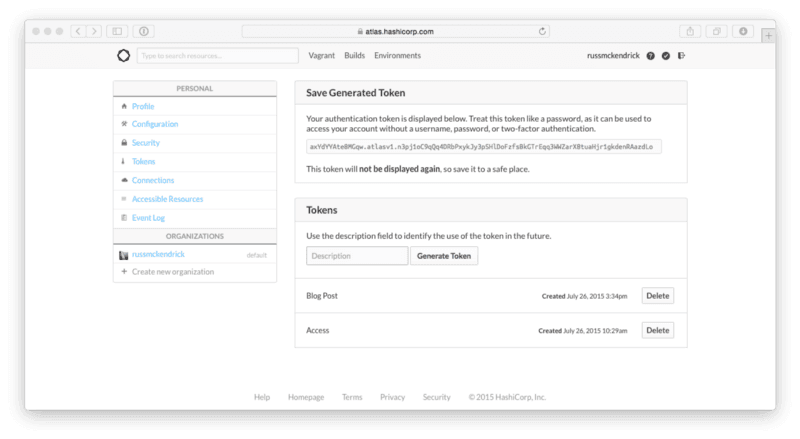 (yes, the token above has been revoked so you can’t use it)
As the message on the page says, make a copy of your token as you will not be able to see it again. Once you have your access token you will need to set it as a environment variable;
```bash frame="terminal" title="Building Vagrant Boxes with Packer in Atlas 4/9"
export ATLAS_TOKEN=”axYdYYAte8MGqw.atlasv1.n3pj1oC9qQq4DRbPxykJy3pSHlDoFzfsBkGTrEqq3WWZarX8tuaHjr1gkdenRAazdLo”
```
#### Packer
For this part of the blog post you can use [my templates](https://github.com/russmckendrick/vagrant/), you can grab them from GitHub using;
```bash frame="terminal" title="Building Vagrant Boxes with Packer in Atlas 5/9"
git clone https://github.com/russmckendrick/vagrant.git
```
Lets use the CentOS 7.1 template, open centos7.json in your text editor of choice and update [the variables at the bottom of the file](https://github.com/russmckendrick/vagrant/blob/master/centos71.json#L111-L116) replacing the atlas_username, atlas_name and artifactversion as needed.
Next up should use packer validate to check there are not any errors with the template file;
```bash frame="terminal" title="Building Vagrant Boxes with Packer in Atlas 6/9"
⚡ packer validate centos71.json
Template validated successfully.
```
Once you have validated the template you will need to push the template to Atlas using packer push;
```bash frame="terminal" title="Building Vagrant Boxes with Packer in Atlas 7/9"
⚡ packer push -m “Initial Push” centos71.json
Push successful to ‘russmckendrick/centos71’
```
Once the template has been pushed you should [see the build in the web interface](https://atlas.hashicorp.com/builds);
(yes, the token above has been revoked so you can’t use it)
As the message on the page says, make a copy of your token as you will not be able to see it again. Once you have your access token you will need to set it as a environment variable;
```bash frame="terminal" title="Building Vagrant Boxes with Packer in Atlas 4/9"
export ATLAS_TOKEN=”axYdYYAte8MGqw.atlasv1.n3pj1oC9qQq4DRbPxykJy3pSHlDoFzfsBkGTrEqq3WWZarX8tuaHjr1gkdenRAazdLo”
```
#### Packer
For this part of the blog post you can use [my templates](https://github.com/russmckendrick/vagrant/), you can grab them from GitHub using;
```bash frame="terminal" title="Building Vagrant Boxes with Packer in Atlas 5/9"
git clone https://github.com/russmckendrick/vagrant.git
```
Lets use the CentOS 7.1 template, open centos7.json in your text editor of choice and update [the variables at the bottom of the file](https://github.com/russmckendrick/vagrant/blob/master/centos71.json#L111-L116) replacing the atlas_username, atlas_name and artifactversion as needed.
Next up should use packer validate to check there are not any errors with the template file;
```bash frame="terminal" title="Building Vagrant Boxes with Packer in Atlas 6/9"
⚡ packer validate centos71.json
Template validated successfully.
```
Once you have validated the template you will need to push the template to Atlas using packer push;
```bash frame="terminal" title="Building Vagrant Boxes with Packer in Atlas 7/9"
⚡ packer push -m “Initial Push” centos71.json
Push successful to ‘russmckendrick/centos71’
```
Once the template has been pushed you should [see the build in the web interface](https://atlas.hashicorp.com/builds);
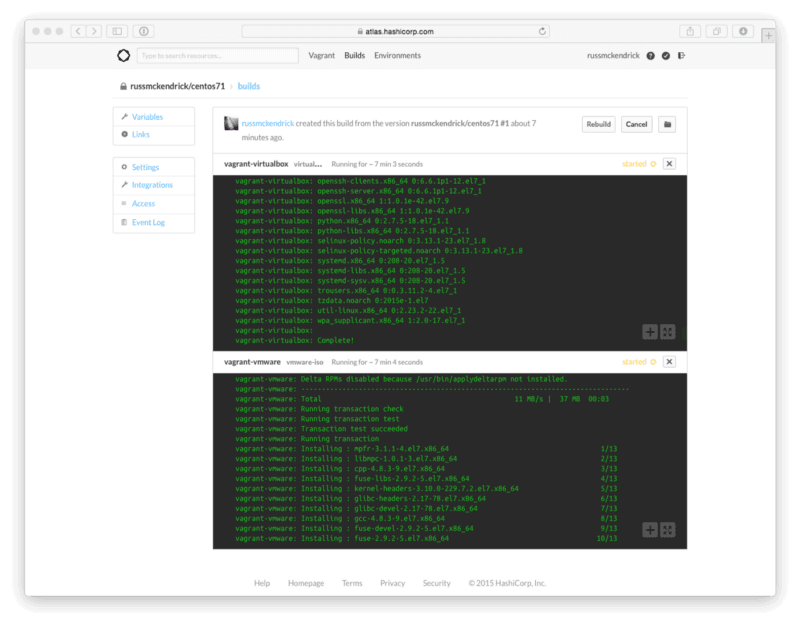 The CentOS 7.1 build takes around 45 minutes to complete.
#### Vagrant
Once the build has completed the artifact will be automatically uploaded to Atlas using the variables you defined earlier in the post. You can view your [Vagrant Boxes in the web interface.](https://atlas.hashicorp.com/vagrant)
Once completed you will be able to use the boxes with the commands which accompany the release e.g.
```bash frame="terminal" title="Building Vagrant Boxes with Packer in Atlas 8/9"
vagrant init russmckendrick/centos71; vagrant up - provider virtualbox
```
or for VMWare;
```bash frame="terminal" title="Building Vagrant Boxes with Packer in Atlas 9/9"
vagrant init russmckendrick/centos71; vagrant up - provider vmware_fusion
```
Remember to wait until the build has completed the version is labelled as released before trying to use the box.
#### Trouble Shooting
One the problems I came across when converting my existing Packer templates to using the Atlas Post-Processor was that I didn’t next the arrays, this resulted in problems with the metadata for the box being correctly embedded which caused errors when trying to launch the box.
The problem is detailed [this GitHub issue](https://github.com/mitchellh/packer/issues/2090).
The CentOS 7.1 build takes around 45 minutes to complete.
#### Vagrant
Once the build has completed the artifact will be automatically uploaded to Atlas using the variables you defined earlier in the post. You can view your [Vagrant Boxes in the web interface.](https://atlas.hashicorp.com/vagrant)
Once completed you will be able to use the boxes with the commands which accompany the release e.g.
```bash frame="terminal" title="Building Vagrant Boxes with Packer in Atlas 8/9"
vagrant init russmckendrick/centos71; vagrant up - provider virtualbox
```
or for VMWare;
```bash frame="terminal" title="Building Vagrant Boxes with Packer in Atlas 9/9"
vagrant init russmckendrick/centos71; vagrant up - provider vmware_fusion
```
Remember to wait until the build has completed the version is labelled as released before trying to use the box.
#### Trouble Shooting
One the problems I came across when converting my existing Packer templates to using the Atlas Post-Processor was that I didn’t next the arrays, this resulted in problems with the metadata for the box being correctly embedded which caused errors when trying to launch the box.
The problem is detailed [this GitHub issue](https://github.com/mitchellh/packer/issues/2090).