# Docker, Fig, NGINX Reverse Proxies and CentOS 7
> Exploring Docker's rapid updates and the ecosystem, including using Fig for container orchestration and setting up an NGINX reverse proxy.
- Canonical: https://www.russ.cloud/2014/08/31/docker-fig-nginx-reverse-proxies-and-centos-7/
- Published: 2014-08-31
- Author: Russ McKendrick
- Tags: Docker, Tools
---
I have been writing a lot about [Docker](https://www.docker.com/) and how I have used it over the last several months so why another another post?
Well, for a start it has a lot of momentum. Since Docker went [1.0 in June](http://blog.docker.com/2014/06/its-here-docker-1-0/) there have been two [further](http://blog.docker.com/2014/07/announcing-docker-1-1/)[releases](http://blog.docker.com/2014/08/announcing-docker-1-2-0/). Also, the ecosystem which has sprung up around Docker is keeping up the same pace as well.
This means that there is always a lot of new shinny things to play with such as …..
#### Fig
Since Docker released 1.0 they have [purchased](http://blog.docker.com/2014/07/welcoming-the-orchard-and-fig-team/)[Orchard Laboratories](https://www.orchardup.com/) who wrote the excellent [Fig](http://www.fig.sh/).
 Fig is a great tool which allows you orchestrate your containers using a single configuration file which looks something like;
```bash frame="terminal" title="Docker, Fig, NGINX Reverse Proxies and CentOS 7 1/4"
webserver:
cover:
image: russmckendrick/nginx-php
volumes:
- /home/containers/web:/var/www/html/
ports:
- 80
environment:
PHP_POOL: testapp
VIRTUAL_HOST: myawesometest.app.mckendrick.eu
links:
- databaseserver:db
databaseserver:
cover:
image: russmckendrick/mariadb
volumes:
- /home/containers/database:/var/lib/mysql/
```
In the example above when fig up is run in the same directory as the fig.yml it will launch two containers and link them together.
In the [terminal session](https://asciinema.org/a/11845) below you can see that I launch an NGINX Proxy (more on that later in this post), and then used fig to launch a [web container](https://github.com/russmckendrick/docker/pkgs/container/php7) and [database container](https://github.com/russmckendrick/docker/pkgs/container/mariadb), the web container runs a simple PHP script which prints the containers IP address to the screen. Once the containers are up and running I then scale the web containers up to 5 containers and then back down to a single container.
Fig is a great tool which allows you orchestrate your containers using a single configuration file which looks something like;
```bash frame="terminal" title="Docker, Fig, NGINX Reverse Proxies and CentOS 7 1/4"
webserver:
cover:
image: russmckendrick/nginx-php
volumes:
- /home/containers/web:/var/www/html/
ports:
- 80
environment:
PHP_POOL: testapp
VIRTUAL_HOST: myawesometest.app.mckendrick.eu
links:
- databaseserver:db
databaseserver:
cover:
image: russmckendrick/mariadb
volumes:
- /home/containers/database:/var/lib/mysql/
```
In the example above when fig up is run in the same directory as the fig.yml it will launch two containers and link them together.
In the [terminal session](https://asciinema.org/a/11845) below you can see that I launch an NGINX Proxy (more on that later in this post), and then used fig to launch a [web container](https://github.com/russmckendrick/docker/pkgs/container/php7) and [database container](https://github.com/russmckendrick/docker/pkgs/container/mariadb), the web container runs a simple PHP script which prints the containers IP address to the screen. Once the containers are up and running I then scale the web containers up to 5 containers and then back down to a single container.
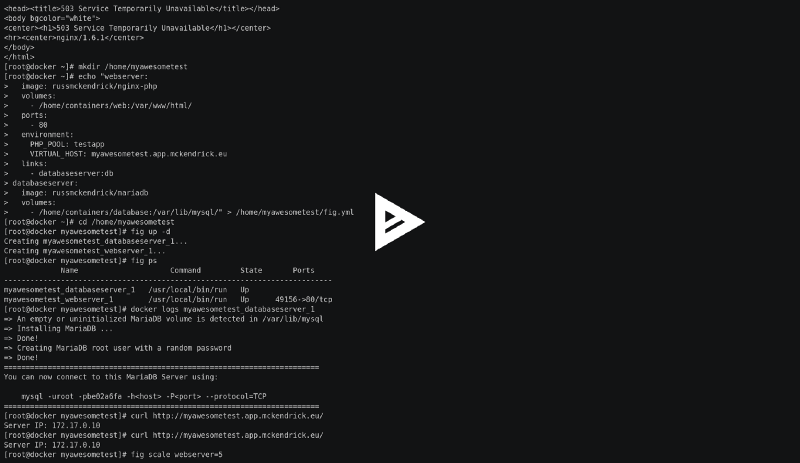 Fig can be installed using the following commands;
```bash frame="terminal" title="Docker, Fig, NGINX Reverse Proxies and CentOS 7 2/4"
[root@docker ~]# curl -L https://github.com/docker/fig/releases/download/0.5.2/linux > /usr/local/bin/fig
[root@docker ~]# chmod +x /usr/local/bin/fig
[root@docker ~]# fig
Punctual, lightweight development environments using Docker.
Usage:
fig [options] [COMMAND] [ARGS…]
fig -h| - help
Options:
- verbose Show more output
- version Print version and exit
-f, - file FILE Specify an alternate fig file (default: fig.yml)
-p, - project-name NAME Specify an alternate project name (default: directory name)
Commands:
build Build or rebuild services
help Get help on a command
kill Kill containers
logs View output from containers
ps List containers
rm Remove stopped containers
run Run a one-off command
scale Set number of containers for a service
start Start services
stop Stop services
up Create and start containers
```
You need to be sure you are running the latest version of Docker, see the last section of this post for details on how to install Docker 1.2 on CentOS 7.
Further reading …..
- [Fig website](http://www.fig.sh/)
- [Fig yml reference](http://www.fig.sh/yml.html)
- Getting Started with [Rails](http://www.fig.sh/rails.html) or [Wordpress](http://www.fig.sh/wordpress.html)
#### NGINX Reverse Proxy
The [terminal session](https://asciinema.org/a/11845) in the previous section of this post shows that I was able to launch my containers using Fig & connect to the URL myawesometest.app.mckendrick.eu which then went on to be load balanced as I scaled the web server containers, so how does that work?
Previously I had been using @garethr’s [Puppet Module](https://forge.puppetlabs.com/garethr/docker) to manage and deploy my containers alongside a NGINX reverse proxy on the host machine. While this worked fine, it did seem a little overkill cerry on using Puppet to manage my containers if I was going to be using Fig.
After consulting the all knowing Google I stumbled across [Jason Wilder’s blog post](http://jasonwilder.com/blog/2014/03/25/automated-nginx-reverse-proxy-for-docker/) about how to configure an Automated Nginx Reverse Proxy for Docker. It seemed like the perfect solution to the problem I was having so I ported his [Dockerfile](https://github.com/jwilder/nginx-proxy) to run using my own [base build](https://github.com/russmckendrick/docker/pkgs/container/base) and then pushed it as a [trusted build](https://github.com/russmckendrick/docker/pkgs/container/nginx).
This means that with a single command …..
```bash frame="terminal" title="Docker, Fig, NGINX Reverse Proxies and CentOS 7 3/4"
docker run -d -p 80:80 -v /var/run/docker.sock:/tmp/docker.sock -t russmckendrick/nginx-proxy
```
….. I can launch a container which runs on port 80 and then listens for containers being launched, if they have the VIRTUAL_HOST environment variable set NGINX will be reconfigured automatically using [docker-gen](https://github.com/jwilder/docker-gen) to serve the new domain.
Couple this with a [wildcard DNS record](http://en.wikipedia.org/wiki/Wildcard_DNS_record) & you have a basic self-service [PaaS](http://en.wikipedia.org/wiki/Platform_as_a_service).
#### Docker on CentOS 7
All of this is great, however the [repo version of Docker in CentOS 7](http://mirror.centos.org/centos-7/) is old, its [0.11](http://blog.docker.com/2014/05/docker-0-11-release-candidate-for-1-0/) which for a piece of software as fast moving as Docker is ancient. Luckily there is a repo on [copr](https://copr.fedoraproject.org/coprs/) which is [hosting EL7 compatible RPMs of the latest builds](https://copr.fedoraproject.org/coprs/goldmann/docker-io/). As I rebuild my servers all the time I knocked out a small [one liner](https://github.com/russmckendrick/docker-install) which installs the later version of Docker on a CentOS 7 server;
```bash frame="terminal" title="Docker, Fig, NGINX Reverse Proxies and CentOS 7 4/4"
curl -fsS https://raw2.github.com/russmckendrick/docker-install/master/install | bash
```
Fig can be installed using the following commands;
```bash frame="terminal" title="Docker, Fig, NGINX Reverse Proxies and CentOS 7 2/4"
[root@docker ~]# curl -L https://github.com/docker/fig/releases/download/0.5.2/linux > /usr/local/bin/fig
[root@docker ~]# chmod +x /usr/local/bin/fig
[root@docker ~]# fig
Punctual, lightweight development environments using Docker.
Usage:
fig [options] [COMMAND] [ARGS…]
fig -h| - help
Options:
- verbose Show more output
- version Print version and exit
-f, - file FILE Specify an alternate fig file (default: fig.yml)
-p, - project-name NAME Specify an alternate project name (default: directory name)
Commands:
build Build or rebuild services
help Get help on a command
kill Kill containers
logs View output from containers
ps List containers
rm Remove stopped containers
run Run a one-off command
scale Set number of containers for a service
start Start services
stop Stop services
up Create and start containers
```
You need to be sure you are running the latest version of Docker, see the last section of this post for details on how to install Docker 1.2 on CentOS 7.
Further reading …..
- [Fig website](http://www.fig.sh/)
- [Fig yml reference](http://www.fig.sh/yml.html)
- Getting Started with [Rails](http://www.fig.sh/rails.html) or [Wordpress](http://www.fig.sh/wordpress.html)
#### NGINX Reverse Proxy
The [terminal session](https://asciinema.org/a/11845) in the previous section of this post shows that I was able to launch my containers using Fig & connect to the URL myawesometest.app.mckendrick.eu which then went on to be load balanced as I scaled the web server containers, so how does that work?
Previously I had been using @garethr’s [Puppet Module](https://forge.puppetlabs.com/garethr/docker) to manage and deploy my containers alongside a NGINX reverse proxy on the host machine. While this worked fine, it did seem a little overkill cerry on using Puppet to manage my containers if I was going to be using Fig.
After consulting the all knowing Google I stumbled across [Jason Wilder’s blog post](http://jasonwilder.com/blog/2014/03/25/automated-nginx-reverse-proxy-for-docker/) about how to configure an Automated Nginx Reverse Proxy for Docker. It seemed like the perfect solution to the problem I was having so I ported his [Dockerfile](https://github.com/jwilder/nginx-proxy) to run using my own [base build](https://github.com/russmckendrick/docker/pkgs/container/base) and then pushed it as a [trusted build](https://github.com/russmckendrick/docker/pkgs/container/nginx).
This means that with a single command …..
```bash frame="terminal" title="Docker, Fig, NGINX Reverse Proxies and CentOS 7 3/4"
docker run -d -p 80:80 -v /var/run/docker.sock:/tmp/docker.sock -t russmckendrick/nginx-proxy
```
….. I can launch a container which runs on port 80 and then listens for containers being launched, if they have the VIRTUAL_HOST environment variable set NGINX will be reconfigured automatically using [docker-gen](https://github.com/jwilder/docker-gen) to serve the new domain.
Couple this with a [wildcard DNS record](http://en.wikipedia.org/wiki/Wildcard_DNS_record) & you have a basic self-service [PaaS](http://en.wikipedia.org/wiki/Platform_as_a_service).
#### Docker on CentOS 7
All of this is great, however the [repo version of Docker in CentOS 7](http://mirror.centos.org/centos-7/) is old, its [0.11](http://blog.docker.com/2014/05/docker-0-11-release-candidate-for-1-0/) which for a piece of software as fast moving as Docker is ancient. Luckily there is a repo on [copr](https://copr.fedoraproject.org/coprs/) which is [hosting EL7 compatible RPMs of the latest builds](https://copr.fedoraproject.org/coprs/goldmann/docker-io/). As I rebuild my servers all the time I knocked out a small [one liner](https://github.com/russmckendrick/docker-install) which installs the later version of Docker on a CentOS 7 server;
```bash frame="terminal" title="Docker, Fig, NGINX Reverse Proxies and CentOS 7 4/4"
curl -fsS https://raw2.github.com/russmckendrick/docker-install/master/install | bash
```